
 The rise of wearable technology is transforming more than just fitness tracking or mobile communication. In the business world, wearables are now helping companies run smarter operations, especially during complex tasks like Accely SAP data migration.
Data migration is often a challenging part of moving to a new ERP system such as SAP S/4HANA. But with the help of wearable tools, companies can collect, manage, and monitor data in real time, making the process more accurate and efficient.
What Is SAP Data Migration?
SAP data migration is the process of moving data from old systems into a new SAP environment. This usually happens when companies:
- Upgrade to SAP S/4HANA
- Move from one ERP system to another
- Consolidate several platforms into one
The goal is to make sure that all master data, transactional data, and system configurations are safely and correctly transferred to the new system. But data migration is more than just a copy-paste job. It requires careful planning, real-time tracking, and validation. This is where wearable devices come into play.
How Wearables Help During Data Migration
Wearable technology includes devices such as smartwatches, smart glasses, fitness bands, and industrial-grade scanners. These devices, when connected to SAP systems, can offer real-time data collection and interaction.
Here’s how they help during data migration:
1. Real-Time Data Collection
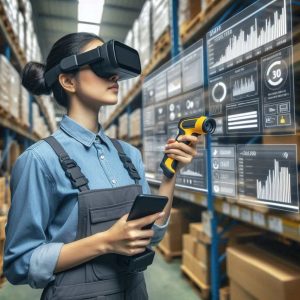
Workers in warehouses and production lines can use wearable scanners or smart glasses to gather live inventory or asset data. This helps validate that what’s in the old system matches what’s physically present.
For example, if SAP is being updated with new warehouse data, employees can simply scan items using a wrist-worn device or glasses and instantly log updates into the system.
This avoids manual errors and speeds up the data verification process.
2. Faster Master Data Cleanup
Before migrating to SAP, companies often need to clean their master data—which includes product numbers, vendor details, customer records, etc.
Wearables can help field workers check and confirm this data while moving through physical sites. Instead of using clipboards or mobile tablets, they can simply speak commands or use a gesture-based device. This makes the cleanup process smoother and more hands-free.
3. Improved Accuracy and Productivity
Because wearable devices work in real time and reduce manual input, they lower the chances of error. This is especially helpful when large volumes of inventory or product data need to be validated or corrected during migration.
With SAP connected to these devices, the system can instantly flag errors, missing records, or inconsistencies—allowing for immediate action.
4. Enhanced Field Visibility
During migration, managers often need updates from the ground—especially in logistics, retail, or manufacturing.
Wearables can send instant data feeds from field teams directly into SAP dashboards. For example, a worker scanning items using a wearable device can update inventory logs, and a manager miles away can see live changes.
This improves decision-making and keeps migration on schedule.
Examples of Wearables Integrated with SAP
Some of the most common wearables being integrated with SAP systems include:
- Smart Glasses: Used for hands-free scanning and display of SAP forms or checklists
- Wearable Barcode Scanners: Wrist-mounted devices for fast item scanning
- Smartwatches: Notifications, task updates, and alerts directly from SAP
- Voice-Controlled Headsets: For navigating data entry workflows without screens
These devices can connect through SAP Business Technology Platform (BTP) or third-party middleware. They work with SAP Fiori apps, mobile workflows, and custom interfaces designed for warehouse and production settings.
Why It Matters During Migration to SAP S/4HANA
Moving to SAP S/4HANA means transforming not just your software, but also how data flows across your business. Wearables help bridge the gap between the physical and digital worlds.
They make it easier to:
- Collect clean, reliable data from the ground
- Reduce back-and-forth between teams during testing
- Speed up validation during mock runs and go-live phases
- Improve employee comfort and efficiency during data tasks